
How to take a plain background product photo with a phone
A table beside a window, a white sheet and a steady phone are enough to take a clean bangle photo, and each step here is easy to repeat for every product.
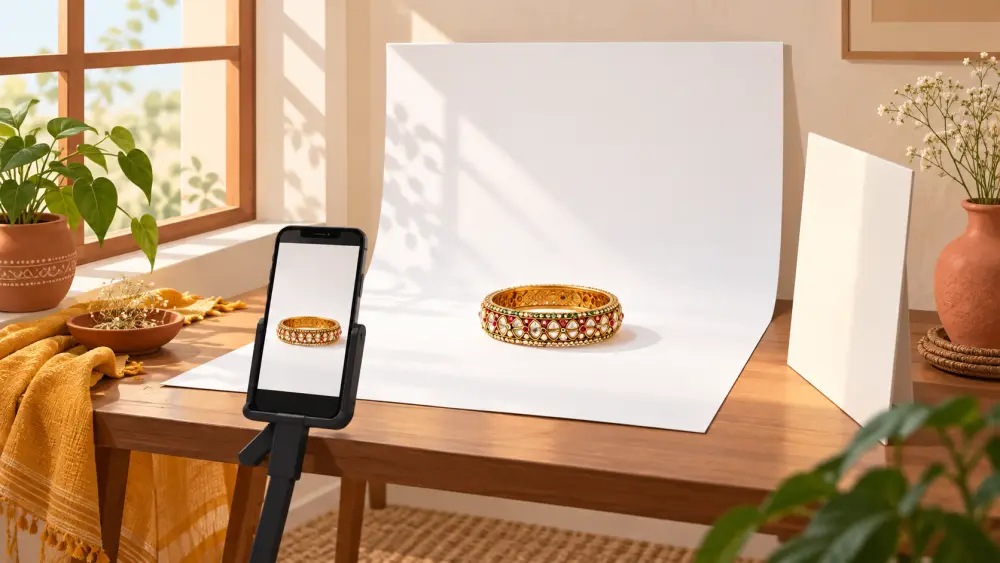
What you need
You do not need a studio or a lamp kit. For a clean, plain-background shot of a set of bangles you need:
- A table or stool near a window.
- A plain white sheet, a large white chart paper or a clean white bedsheet.
- Something to hold the backdrop up behind the table, such as a wall, a chair back or tape.
- Your phone, and a book or small stack to rest it on if you have no tripod.
- A second sheet of white card or paper to bounce light back.
Step 1: set up near the window
Place the table next to a window so light falls on it from one side. Soft daylight, not direct sun, is best. Midmorning or late afternoon in a bright room often works well. If the sun is harsh, hang a thin white curtain over the window to soften it. Our post on using window light for product photography goes deeper.
Step 2: build a seamless backdrop
Tape the white sheet to the wall behind the table and let it curve down onto the table surface without a sharp fold. That smooth curve means no visible line behind the product. Smooth out any wrinkles. If you need other ideas, making a DIY white background for products shows a few.
Step 3: place the bangles
Lay the bangles stacked or standing, depending on what you want to show. Wipe each one first, since dust and fingerprints are very visible against white. Our post on avoiding fingerprints and dust in product photos lists simple tricks. Arrange them a little away from the back edge of the sheet so the backdrop looks even.
Step 4: bounce the light
Hold or prop the second sheet of white card on the side opposite the window, just out of the frame. It reflects light back onto the shadowed side of the bangles and softens harsh shadows. You can see the difference immediately on your phone screen. Read using a reflector with white chart paper.
Step 5: set up the phone
- Clean the lens with a soft cloth.
- Rest the phone on a stack of books at the same height as the product, or use a small stand.
- Turn on the grid lines and use them to keep the shot straight.
- Tap on the bangles to set focus and exposure. If the white background looks grey, slide the brightness up a little.
- Use the timer or a volume button to avoid shaking the phone.
For more about phone settings see best phone camera settings for product photos.
Step 6: take, check, repeat
Shoot a few frames from the front, from slightly above, and one close-up of the design. Zoom into each to check sharpness. Metal and glass bangles can reflect the window or you, so move slightly if you see unwanted shapes.
Step 7: light touch-ups
If the background looks a little dull, brighten the photo with a free app, but do not push it so far that the product colour changes. See how to brighten product photos without ruining them.
I should be clear that a plain background is a style choice that suits many stores, not a rule you must follow to sell online. Use it because it shows your product honestly and keeps your catalogue tidy. Once you have the setup, you can shoot a whole range in one sitting, as our guide to batch shooting a catalogue in one day explains.