
How to photograph shiny and reflective products without glare
Shiny surfaces mirror whatever is in front of them. Control the angle, use one large soft light, and block what you do not want reflected.
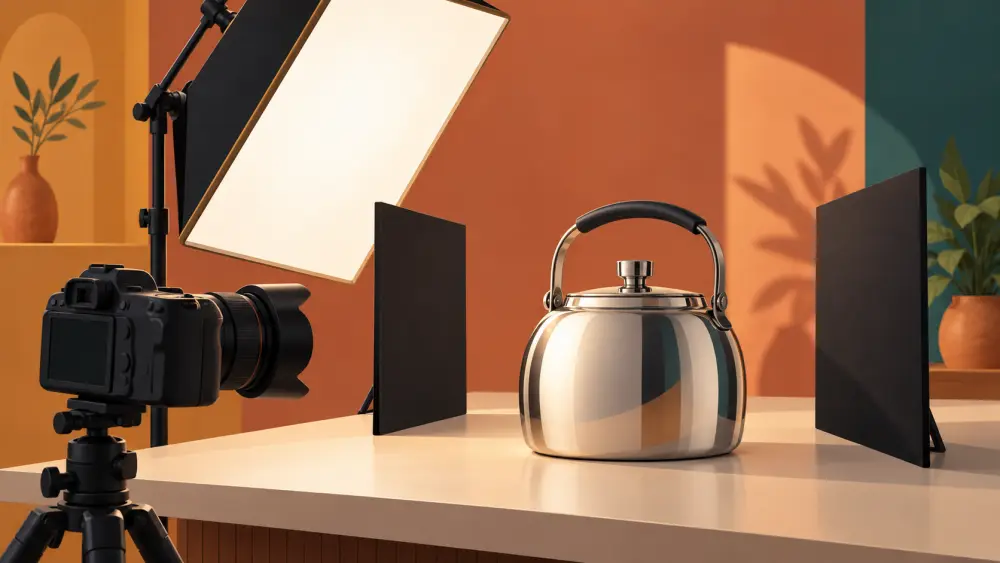
A shiny product behaves like a small mirror. The camera does not see the surface so much as it sees what the surface reflects: the window, the lamp, your own shape holding the phone. The fix is to control what is in front of the product.
Think of it as managing reflections
You cannot remove reflections from a mirror-like surface. You can only choose what appears in them. Your aim is a smooth, clean reflection of something large and soft, rather than small bright spots or messy objects.
You also should not promise yourself a perfect result. Some products, such as heavily curved or chrome-like surfaces, are simply hard, and a good-enough photo is a fine goal.
Use one large, soft light
Small bright light sources make small bright reflections. A large soft light makes a gentle, wide reflection that looks natural. A window with the curtain pulled across, or a thin white cloth hung in front of the window, becomes a big soft panel. Keep to a single main light, because each extra light adds another reflection to deal with. The related guide on using window light covers the setup.
Change the angle, not just the light
Reflections depend on where the camera and the light are, in relation to the surface. If the glare is a hot white patch, try:
- Moving the camera slightly left or right. A small shift can move the reflection off the important area.
- Tilting the product a few degrees. This changes what the surface mirrors.
- Moving the light. Bring it more to the side, so the bright reflection falls away from the lens.
Take a photo after each small change. The screen preview shows you the effect right away, so adjust by looking, not by theory.
Block the stuff you do not want
Stray reflections of the room come from things behind and beside the camera. Use "flags", which is just a word for anything that blocks light or reflections: a sheet of black or dark chart paper, a dark cloth, or even a cardboard box side. Hold or prop them beside the product, out of frame, to cut distracting reflections and to darken an edge so the product's outline reads clearly. White paper does the opposite and fills shadows with light, as in using a reflector.
If you are in the reflection, wear dark plain clothes, stand a bit further away, and cover the phone as much as possible. Many people find the timer helps, since you can step away.
Keep it clean
Shiny surfaces show every fingerprint and speck of dust, so clean the product with a soft dry cloth before shooting, and handle it by the edges, ideally with clean cotton gloves or a cloth. Avoiding fingerprints and dust has more detail.
Check at full size
Zoom in before you put the props away. Look at the edges and curved sections for small bright spots, and check that no reflection shows a face or a window frame. A little reflection is normal and even helps the product look real, so decide whether it distracts, not whether it exists.
Match the product to the guide
Different shiny products have their own tricks. Metal kitchenware is covered in photographing steel and metal utensils, glassware in photographing glass bottles and jars, and small metal items in photographing jewellery with a phone. The general idea stays the same: one large soft light, a controlled angle and clean surfaces.