
How many photos should each product listing have?
There is no magic number, but there is a sensible shot list for each kind of product. Here is how to decide what your buyers need to see.
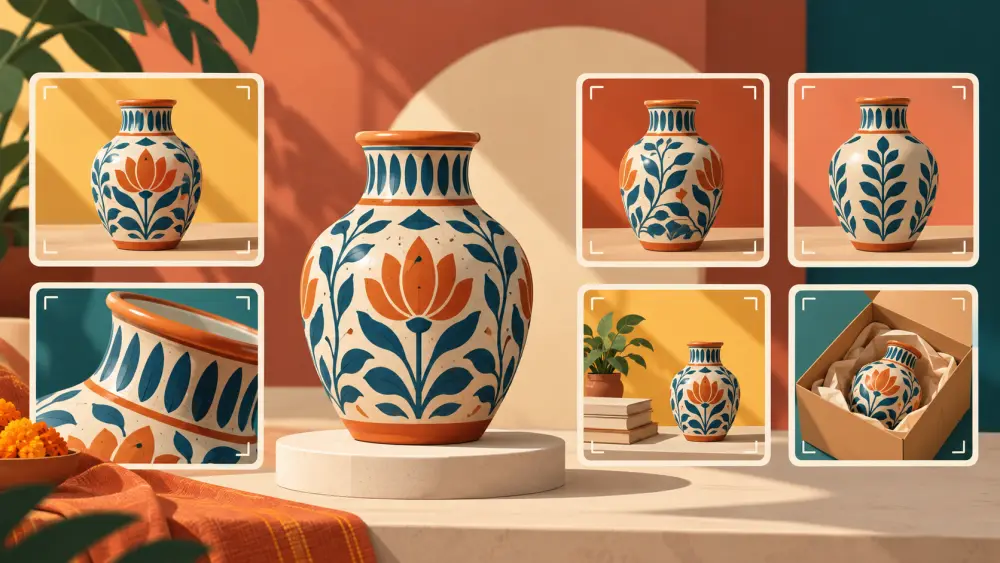
Sellers often ask for a number: three photos, five, ten? The honest answer is that the right number depends on what the buyer needs to see to feel sure. A better question is what questions a photo needs to answer, and how many pictures it takes to answer them.
Think in questions, not counts
Before you shoot, list what a buyer will wonder about the product. What does it look like? What colour is it really? How big? How is it made? How does it look on or in use? What comes in the box? Each question that cannot be answered in words alone deserves a photo. When a new photo adds no new information, it is probably not needed.
A starting point by product type
These are suggestions, not rules, so adjust to your own range.
- Simple, flat products like stickers, cards or prints: a main photo, a close detail and a scale shot are often enough.
- Jewellery and small accessories: a front view, a close detail, a worn shot and a scale shot, since small details matter. See how to photograph earrings and rings.
- Clothing: front, back, a detail of fabric or print, a worn shot and a flat lay, because fit and fall are hard to judge.
- Bags and footwear: several angles, inside and sole views, plus a worn or held shot.
- Food and skincare: the pack front, the back label, the contents or texture, and a group or in-use shot.
- Home decor: the item alone, a room setting and a scale reference.
The angle list in which angles to shoot for every product turns this into a repeatable shot list.
Order matters as much as count
Buyers often see only the first image on a card or while scrolling. Put the clearest, most representative photo first, and follow it with the ones that answer the next questions. A main image guide is in what your main product photo should show. In Varchas, each product has a main image and a gallery of further photos, and a product with colours can carry photos for each colourway, so you can show every variant properly. How to set up colours is in product variants, colourways and sizes.
Do not pad with near-duplicates
Five photos of the same angle with minor changes add nothing and slow the page. Choose the sharpest and discard the rest. Quality and variety beat quantity.
Keep it consistent across products
If similar products have similar sets of photos, buyers learn where to look. A set routine also saves you time, and the tidy catalogue approach matches the case for a smaller catalogue, where focusing on fewer products lets you do each one properly.
A simple approach
Start with a core set you can repeat for every product, then add extras for items that need them, such as a texture close-up or a size comparison. Review your listings after a few weeks and see which questions customers still ask by message. Each repeated question is a photo you could add.